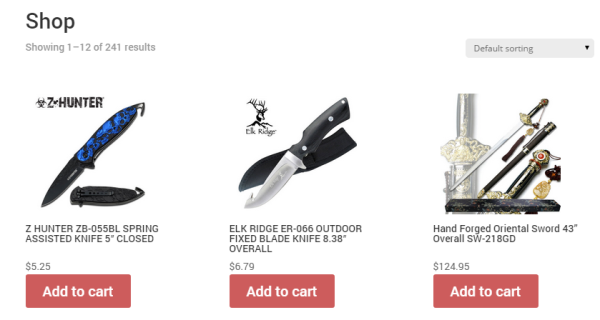
Hello WordPress developers. This is one of the most common question I have come across the internet while developing an E-commerce website using one of the best plugin ‘WooCommerce – Excelling ecommerce’ by WooCommerce. Unfortunately WooCommerce haven’t provided any visible option to activate this handy feature to show ‘add to cart’ on homepage, shop page or archives whatever you want to call it. This is how it looks without ‘Add to cart’ buttons.
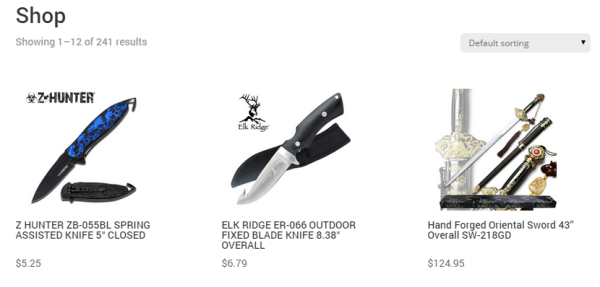
And this is how it will look after adding ‘add to cart’ buttons. Looks cool ‘eh?
Trust me its really easy to do, no rocket science involved. Many professional coders write their own snippets to add this function but guess what, WooCommerce themselves has added this feature but its hidden or not mentioned. Now you must be thinking where it is hidden? Let me show you where it is.
If you go into your WordPress dashboard and then to the Appearance > Editor and select your theme from the option ‘Select theme to edit:’, you have now all core files of your theme with so much code in it. Don’t worry you don’t really need to mess up with much of them but only a single file. If you are using WooCommerce plugin compatible theme then the plugin itself add functions automatically to your theme files to function properly. Like I’m using Divi theme from Elegant themes, its amazing.
1. Find ‘functions.php’ and click on it.
2. Press Ctrl + F (Command + F for Mac users) and find this piece of code.
remove_action( ‘woocommerce_after_shop_loop_item’, ‘woocommerce_template_loop_add_to_cart’, 10 );

3. Simply delete ‘remove_action’ and replace it with ‘add_action’ or you can also just replace by copying the whole code given below.
add_action( ‘woocommerce_after_shop_loop_item’, ‘woocommerce_template_loop_add_to_cart’, 10 );
And it should look like this:

It should fix your problem. Happy WordPressing. 😉
Hi
This is a great tutorial. I do have one issue though. When i hover over the “add to cart” button, i get a number 5 appearing next to this. Why is this?
Thank you very much !!
this has been really helpful!!
By the way… do you know how to add the ability to add multiple items from the same product on the shop page?
Hi, thanks! This is so helpful. The only question I have… This only works when you actually remove the “remove_action” line from the theme’s function.php file. But doesn’t that get overwritten with updates? So my question: how does this work when using the function.php file from the child theme please?
Finally, something helpful!
thank you very much!
Fantastic it worked thank you! The bits above the button are centre aligned but the button is left aligned. How can I centre align the button?
Thanks so much for this. Works a treat. After reading Valerie Maes’ comment below I’d like to know if this will get over written by updates and if there’s a way around this if so. Well happy though and will update manually if needed!